4 Designs · PDF & Word Download · Free · No Signup

Free AI Resume Builder — Create a Professional Resume in Minutes

The fastest free resume builder online. Fill in your details once, let AI write your professional summary, choose from 4 ATS-friendly resume designs, and download as PDF or Word — instantly, no account needed.

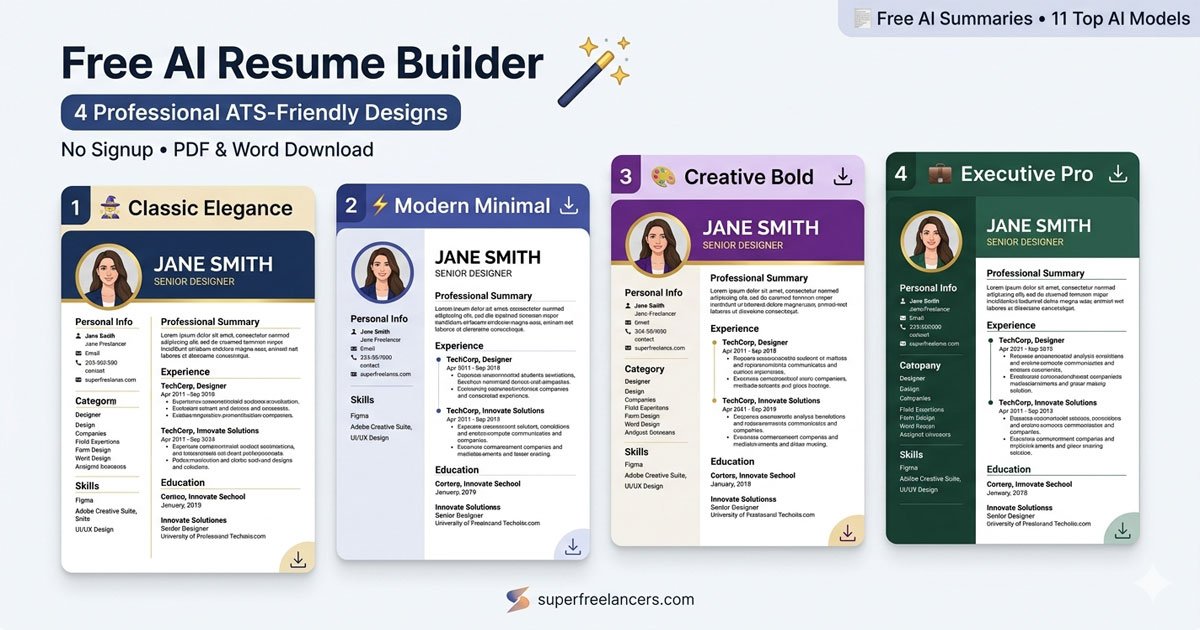
Classic Elegance Modern Minimal Creative Bold Executive Pro
50K+resumes created
4ATS-friendly designs
11AI models to choose from
★ 4.8average user rating
Free AI resume builder showing four professional resume templates: Classic Elegance, Modern Minimal, Creative Bold, and Executive Pro
50 of 50 free AI summaries remaining
No account needed · Download PDF & Word always free
Resume Details
Fill in your info · Preview updates live

Profile Photo

JPG or PNG, recommended 300×300px

0 / 600
AI Model for Summary Select one model

How the Free AI Resume Builder Works

From blank page to a polished, ATS-optimized, downloadable resume in under 3 minutes

1
Add Your Details
Enter your name, job title, work experience, education, skills, languages, and certifications. Every field updates the live resume preview instantly as you type.
2
AI Writes Your Summary
Pick any of 11 AI models — including Grok, Gemini, and GPT — to auto-write a compelling, ATS-optimized professional summary tailored to your job title and skills. Takes seconds.
3
Choose Your Design
Switch between 4 ATS-friendly professional resume designs: Classic Elegance, Modern Minimal, Creative Bold, and Executive Pro. All designs update live so you can compare instantly.
4
Download PDF or Word
Download your finished, professional resume as a print-ready PDF or editable Word document instantly. No watermarks, no signup, no hidden fees — completely free.

Why Use Our AI Resume Builder?

Everything a job seeker needs to stand out and get hired

11 AI Models for Summaries

Generate your professional summary using Grok, Gemini, GPT, NVIDIA Nemotron, Qwen, and more. All free.

4 Stunning Resume Designs

Classic Elegance, Modern Minimal, Creative Bold, and Executive Pro. All professional and ATS-friendly.

Live Preview

See your resume update in real time as you type. Every change is reflected instantly across all 4 designs.

Profile Photo Upload

Add your professional headshot directly to the resume. Supported in all 4 design templates.

Skills, Languages & More

Add unlimited skills as tags, languages with proficiency bars, certifications, and project showcases.

PDF & Word Download

Download your finished resume as a print-ready PDF or an editable Word document. No watermarks, ever.

How to Write a Resume That Gets Past ATS and Impresses Hiring Managers

Practical resume writing tips from the SuperFreelancers team — used by 50,000+ job seekers

What Is an ATS-Friendly Resume?

An applicant tracking system (ATS) is software used by over 98% of Fortune 500 companies and most mid-size businesses to screen job applications automatically before a human recruiter ever reads them. An ATS-friendly resume uses standard section headings (like Work Experience, Education, and Skills), clean formatting without complex tables or graphics, and relevant keywords that match the job description.

All four designs in our free AI resume builder are engineered to be ATS-compatible. Whether you choose the Classic Elegance template for a finance role or the Creative Bold design for a marketing position, your resume will be parsed correctly by any major applicant tracking system including Taleo, Workday, Greenhouse, and Lever.

Writing a Professional Summary That Works

The professional summary (sometimes called a resume objective or personal statement) is the first thing a hiring manager reads. It should be 2–4 sentences that immediately communicate your job title, years of relevant experience, key skills, and the value you bring to an employer. Avoid vague phrases like "hard-working team player" — instead, use specific, measurable language like "results-driven marketing manager with 7 years scaling SaaS products from seed to Series B."

Our AI resume writer uses your job title, skills, and experience to generate an ATS-optimized professional summary instantly. You can select from 11 top AI models — including Grok 4, Gemini 2.0 Flash, GPT OSS 120B, NVIDIA Nemotron, and Qwen3 — each producing a unique, human-quality summary you can accept, regenerate, or edit to match your voice and target role.

Resume Format: Which Layout Is Right for You?

The best resume format depends on your career stage and industry. A chronological resume — listing work experience from most recent to oldest — is the standard choice and preferred by most recruiters and ATS software. A functional resume emphasises skills over job history and works best for career changers or those with employment gaps. A combination resume balances both.

Our four resume templates cover the full spectrum of professional needs:

  • Classic Elegance — Best for traditional industries: law, finance, accounting, academia, government
  • Modern Minimal — Ideal for tech, engineering, product management, and startups
  • Creative Bold — Designed for creative roles: graphic design, UX, marketing, content, media
  • Executive Pro — Tailored for senior management, directors, VPs, and C-suite executives

Key Resume Sections Every Job Application Needs

A complete, professional resume should include these core sections in order:

  1. Contact Information — Full name, professional email, phone, LinkedIn URL, and portfolio/website if relevant
  2. Professional Summary — 2–4 sentence overview of your experience, skills, and career goals
  3. Work Experience — Job title, company, dates, and bullet-point achievements (use action verbs and quantified results)
  4. Education — Degree, institution, graduation year; include GPA only if above 3.5 and within 3 years of graduation
  5. Skills — A curated list of hard and soft skills relevant to the role you're applying for
  6. Languages — List any languages with proficiency level (Beginner, Intermediate, Advanced, Native)
  7. Certifications & Projects — Optional but powerful; especially important in tech, finance, and creative fields

Our resume builder includes dedicated sections for every item above, with a live preview that updates as you type so you can see exactly how your finished CV will look to a hiring manager.

Resume Writing Tips to Get More Interviews

  • Tailor your resume to each job description. Mirror the exact language and keywords used in the job posting to pass ATS filters.
  • Quantify your achievements. "Increased sales by 32%" is far stronger than "increased sales significantly."
  • Use strong action verbs. Start each bullet point with words like Led, Built, Launched, Optimised, Delivered, Reduced, Managed, Designed.
  • Keep it to one page if you have under 10 years of experience; two pages for senior roles with extensive relevant history.
  • Proofread carefully. Spelling and grammar errors are the top reason recruiters reject resumes at first glance.
  • Save and send as PDF. PDF preserves your resume layout across all devices and email clients. Use our Download PDF button for a print-ready version.

About SuperFreelancers

SuperFreelancers is a free career tools platform built by a team of recruiters, developers, and HR professionals. Since 2020, we've helped over 50,000 job seekers create professional, ATS-friendly resumes, cover letters, and career documents. Our tools are used by fresh graduates, mid-career professionals, and senior executives across 80+ countries. Have a question? Contact our team or visit our About page.

Founded 2020 50,000+ users 80+ countries 4.8 / 5 average rating

Frequently Asked Questions

Everything you need to know about building your AI-powered resume

Yes, completely free with no account required. You get 50 free AI summary generations using 11 top AI models including Grok, Gemini, and GPT. Downloading your finished resume as PDF or Word is always free with no limits and no watermarks — ever.
Yes. All 4 resume designs are built to pass applicant tracking systems (ATS) used by recruiters and hiring managers. They use standard section headings, clean single-column or structured two-column layouts, and avoid graphics or tables that ATS software cannot parse. Your resume will be readable by both automated screening systems and human reviewers.
Classic Elegance (navy and gold, ideal for traditional industries like law, finance, and academia), Modern Minimal (dark header with indigo accents, perfect for tech and startups), Creative Bold (purple with gold accents, designed for creative roles in design, marketing, and media), and Executive Pro (deep green, tailored for senior and C-level positions). All 4 designs are ATS-compatible and update live in the preview.
Yes. Click the photo circle at the top of the form to upload a JPG or PNG (recommended 300×300 px). Your professional headshot appears in the header of all 4 resume templates, automatically styled to match each design. Note: if applying to companies in the US, consider omitting a photo as some employers prefer anonymous applications to avoid unconscious bias.
Select any of the 11 AI models available, fill in your name, job title, skills, and work experience, then click the AI Write button. The model generates a 3-sentence, ATS-optimized professional summary packed with relevant keywords for your role — in seconds. You can regenerate as many times as you like or manually edit the result to match your voice and target job application.
Yes. You can add as many work experience and education entries as needed using the Add buttons in each section. Each entry includes fields for job title, company, location, dates, and a description where you can list key achievements and responsibilities. Entries can be removed individually at any time.
You can download your resume as a PDF (print-ready, pixel-perfect, ideal for email submission and job portals) or a Word (.doc) document for further editing in Microsoft Word or Google Docs. A direct browser print option is also available if you prefer to print to your local printer or save via your system print dialog.
Your resume data is stored in your browser memory while you work on the page. Closing or refreshing the page will clear it, so always download your resume before leaving. No personal data is uploaded to or stored on our servers. For data privacy details, see our Privacy Policy.
Generating Your Summary…
AI is crafting your professional summary