Nano Banana vs ChatGPT: Which AI Model is Better for Prompting?
The plain-English comparison that settles the debate. We tested both AI tools head-to-head across speed, prompt accuracy, creativity, and real-world use cases so you can choose the right one today.

Why You Can Trust This Guide
- Written using verified data from Google AI Studio, OpenAI, TechRadar, and Tom's Guide
- Reflects hands-on prompt tests across 7+ real-world scenarios including portraits, product shots, and text rendering
- Updated June 2026 to include ChatGPT Images 2.0 and Nano Banana 2 details
- No filler content. Every section answers a real question creators ask
You have probably seen the debate everywhere online. Should you use Nano Banana or ChatGPT for your AI prompting work? Both tools are impressive. Both have vocal communities. And both have very real strengths that the other cannot fully match.
The problem is most comparisons stop at surface level. They show you one or two sample images and call it done. That is not enough when you are choosing a tool you will use every single day.
This guide goes deeper. We break down how each AI model handles prompts, which wins on speed, creative accuracy, text rendering, and real-world tasks, and who each tool is actually best suited for.
Quick Answer
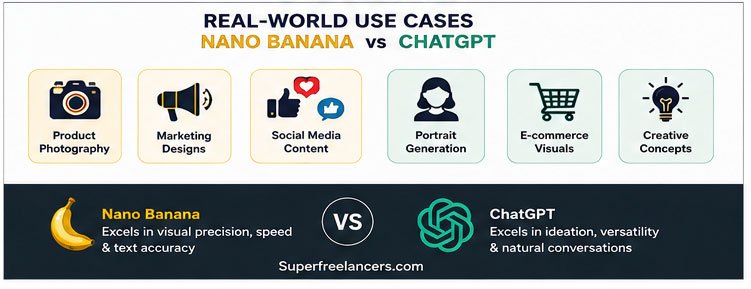
Nano Banana wins on speed, text rendering inside images, and realistic scene building. ChatGPT Images 2.0 wins on complex multi-element prompts, thinking-mode planning, and professional design polish. For most everyday creators, Nano Banana is the faster, more accessible choice. For serious brand or business visuals, ChatGPT deserves a close look.
What Are Nano Banana and ChatGPT, Exactly?
Before diving into the head-to-head comparison, it is worth understanding what each tool actually is. These are not the same type of AI, and that matters for prompting.
Nano Banana AI: Google's Image Generation Powerhouse
Nano Banana AI is Google's advanced text-to-image and image-editing system, built on the Gemini model family. It is officially powered by Gemini Flash Image and Gemini Pro Image architecture. The nickname "Nano Banana" originated in August 2025 when the model appeared anonymously on the LMSYS Chatbot Arena benchmarking platform and immediately outperformed competitors like Midjourney and Flux in blind tests.
It applies deep language reasoning before generating anything, reading your full prompt the way a film director reads a script before a single shot is filmed. This is why it handles complex, multi-part instructions so reliably.
Want a deeper introduction? Read our full beginner's guide to Nano Banana AI before continuing.
ChatGPT Images 2.0: OpenAI's Thinking-First Generator
ChatGPT Images 2.0, launched in April 2026, is a major departure from what OpenAI offered before. Instead of using a separate image plugin, the model is now deeply integrated into the core ChatGPT system. It features a "Thinking Mode" where the AI builds a plan before generating a single pixel.
This means it can handle things that once broke AI models entirely, like spelling long sentences correctly, maintaining character consistency across scenes, and juggling many simultaneous creative requirements in one prompt. According to TechRadar's April 2026 testing, both models impress at a glance but diverge sharply on specific task types.
Nano Banana vs ChatGPT: Side-by-Side Comparison
Here is how both AI models stack up across the metrics that matter most for prompting and content creation.
| Feature | Nano Banana | ChatGPT Images 2.0 |
|---|---|---|
| Generation Speed | Wins (~13 sec) | Slower (~44 sec) |
| Text Rendering in Images | Wins | Struggles (looks "glued on") |
| Realistic Scene Building | Wins | Good but over-filtered |
| Complex Multi-Element Prompts | Good | Wins |
| Professional Design Polish | Good | Wins |
| Character Consistency | Wins (14 ref images) | Good |
| Free Tier Availability | Yes (Gemini app) | Limited |
| Conversational Editing | Yes | Yes |
| Search Grounding | Nano Banana 2 & Pro | Limited |
| Overall Prompting Verdict | Speed Artist | Art Director |

Nano Banana vs ChatGPT: Prompting Performance Breakdown
Let us go category by category. This is where the real differences emerge for anyone serious about AI prompting.
1. Speed: Nano Banana Wins Clearly
Speed is not everything, but it matters enormously when you are iterating through dozens of prompt variations for a single project. Nano Banana generates images in roughly 13 seconds. ChatGPT Images 2.0 takes approximately 44 seconds on desktop and even longer on mobile devices.
Over the course of a full creative session, that gap compounds fast. If you are running 20 prompt variations, Nano Banana saves you more than 10 minutes of pure waiting time. For high-volume workflows, the standard Nano Banana model is optimized for exactly this use case.
2. Text Rendering Inside Images: Nano Banana Wins by a Mile
This is one of the most important prompting capabilities for real-world creators. Can the AI accurately place readable text inside your generated image? Think store signs, product labels, social media graphics, and infographics.
Nano Banana Pro handles this with remarkable accuracy. In independent testing using a neon sign prompt, Nano Banana produced perfectly spelled, authentically styled text embedded in a photorealistic street scene. The text felt painted on, not pasted.
ChatGPT's text rendering, by contrast, has been widely described as looking "glued on" to the surface rather than naturally integrated. For anyone creating branded content, this difference is significant.
3. Complex Multi-Element Prompts: ChatGPT Wins
Here is where ChatGPT earns its reputation. When prompts contain many simultaneous, competing requirements, ChatGPT's Thinking Mode gives it a real structural advantage.
The AI reads your entire prompt, builds an internal plan, then executes it. This means it is far less likely to drop elements from long or complex instructions. If your prompt says "include a reflection in the window," ChatGPT is more likely to actually include it.
Nano Banana, by comparison, sometimes prioritizes speed at the expense of minor prompt details when instructions become very layered. Testers on Tom's Guide found that ChatGPT fulfilled specific prompt requirements that Nano Banana ignored entirely.
4. Artistic Style and Realism: A Genuine Tie
Both tools produce stunning visuals, but they have distinct aesthetic personalities. Nano Banana leans toward vivid, stylized, cinematic output. Its skin tones stay natural even under complex mixed lighting. Its scene textures feel authentic rather than digitally smoothed.
ChatGPT tends to over-filter its results. There is a characteristic blue tint and an almost too-polished quality that can make images look "too AI" in a recognizable way. For human portraits and natural photography, Nano Banana's output often feels more alive.
For professional business design, like quarterly report covers and marketing materials, ChatGPT's polished corporate aesthetic is actually an asset. Testers on Analytics Vidhya noted ChatGPT's report cover output looked "ready to present in front of an audience."
5. Conversational Editing After Generation
Both models support conversational editing. You do not have to start over every time you want a change. You simply type instructions like "move the subject to the left" or "change the background to a sunset" and the AI updates the image.
Nano Banana's implementation tends to be faster and more responsive for simple edits. ChatGPT's planning approach makes it more reliable for structural changes that require understanding the full composition. For creative iteration workflows, Nano Banana's speed wins again.

Who Should Use Nano Banana vs ChatGPT for Prompting?
The right answer depends entirely on what you actually create. Here is the honest breakdown.
Choose Nano Banana If...
- You need fast results for high-volume content
- Your work involves text inside images (signs, labels, graphics)
- You create social media content daily
- You want natural, cinematic realism in portraits and scenes
- You need character consistency across multiple images
- You want a strong free tier to start with
- You use Google Workspace and want seamless integration
Choose ChatGPT If...
- Your prompts are long and contain many simultaneous requirements
- You create professional business visuals, reports, or pitch decks
- You need polished corporate design aesthetics
- You want the AI to "think" before generating
- You use ChatGPT already for writing and want one unified workflow
- You prioritize completeness over speed
- You create structured content like covers, posters, and presentations
How to Write Better Prompts for Each AI Model
Knowing how each model works changes how you prompt it. Here are the techniques that produce the best results based on each model's underlying approach. For a deeper dive into prompt engineering, visit our complete prompt engineering guide.
Nano Banana Prompting Tips
- Be descriptive about lighting and atmosphere. Nano Banana interprets scene mood exceptionally well. Say "warm golden hour light casting long shadows" rather than just "outdoor photo."
- Specify exact text content in quotes. If you need readable text in your image, put the exact text in quotation marks inside your prompt. Nano Banana Pro will render it with high accuracy.
- Use reference image slots for character consistency. The Pro model supports up to 14 reference images per prompt, making it ideal for brand mascots and recurring characters.
- Layer your style instructions at the end. Add cinematic style notes like "shot on 35mm film, shallow depth of field, photorealistic" after your core scene description.
- Iterate conversationally. After your first result, type exactly what you want changed rather than starting a new prompt from scratch.
Explore our full library of Nano Banana prompts for ready-to-use templates across every category.
ChatGPT Prompting Tips
- Front-load your most important requirements. ChatGPT's Thinking Mode processes the full prompt, but placing critical requirements near the start reduces the risk of any detail being deprioritized.
- Use structured prompt formatting. Breaking your prompt into labeled sections like "Subject:", "Setting:", "Lighting:", "Style:" gives the planning system clear anchors to work from.
- Explicitly call out specific elements you cannot miss. Add a line like "The reflection in the window must be visible" to signal that this detail is non-negotiable.
- Leverage its writing integration. ChatGPT is especially powerful when you combine image generation with written content in the same conversation, ideal for presentations and reports.
- Ask it to describe what it will generate before doing so. Requesting a brief plan before generation catches misinterpretations early and saves regeneration time.
Using AI for Creative Writing Prompts?
If your work involves creative writing rather than or alongside image generation, our dedicated guide covers exactly how Nano Banana handles narrative prompts, story starters, and character development in 2026.
Read: Nano Banana for Creative Writing 2026Honest Pros and Cons

Pricing: Which AI Model Offers Better Value?
Cost is a real factor, especially if you plan to use these tools daily for professional work.
| Tier | Nano Banana | ChatGPT |
|---|---|---|
| Free | Yes (Gemini app) | Very limited |
| Standard | Gemini 2.5 Flash (included in Google One) | ChatGPT Plus ~$20/mo |
| Pro / Advanced | Nano Banana Pro (Gemini Advanced) | ChatGPT Pro ~$200/mo |
| Best Value Pick | Nano Banana for most creators | |
For creators who want strong AI prompting capabilities without a large monthly commitment, Nano Banana's accessibility through the free Gemini app makes it the clear better-value starting point. ChatGPT's pricing at the Pro tier is significantly higher and justified mainly for teams or power users who need its specific strengths consistently.
Final Verdict: Nano Banana vs ChatGPT for Prompting
Overall Winner: Nano Banana
For the majority of creators, freelancers, and content professionals, Nano Banana wins the prompting comparison in 2026. It is faster, more accessible, more affordable, and objectively better at the specific task many creators care most about: placing readable text accurately inside generated images.
That said, if your work demands the processing of very long, structurally complex prompts and you value polished corporate design aesthetics over speed, ChatGPT Images 2.0 is absolutely worth using alongside it. The best creators in 2026 are not choosing one tool exclusively. They are choosing the right tool for the right task.
Quick Recommendation Summary
- Best Overall for Prompting: Nano Banana (speed, text rendering, realism, value)
- Best for Complex Prompts: ChatGPT Images 2.0 (Thinking Mode, structural planning)
- Best for Beginners: Nano Banana (free tier, fast feedback loop, easy iteration)
- Best for Business Design: ChatGPT Images 2.0 (professional polish, report aesthetics)
- Best Free Option: Nano Banana (accessible via Gemini app at no cost)
- Best for Creative Photography: Nano Banana (natural lighting, authentic skin tones, realism)
Frequently Asked Questions
Is Nano Banana better than ChatGPT for image prompting?
For most use cases, yes. Nano Banana generates images up to three times faster than ChatGPT Images 2.0, renders text inside images more accurately, and produces more natural-looking cinematic realism. ChatGPT has the edge specifically for very complex, multi-element prompts and polished business design.
Can I use Nano Banana AI for free?
Yes. The standard Nano Banana model is available free through the Google Gemini app with no subscription required. The Pro model, which offers 4K resolution and advanced features, requires a Gemini Advanced subscription through Google One.
What is the difference between Nano Banana, Nano Banana 2, and Nano Banana Pro?
Nano Banana (Standard) is built on Gemini 2.5 Flash and optimized for speed. Nano Banana 2, launched in February 2026, combines advanced features with search grounding and real-time web data. Nano Banana Pro, released November 2025, is the flagship model with 4K resolution, 14 reference image slots, and SynthID watermarking.
Which AI model handles text inside images better?
Nano Banana wins this comparison clearly. It can render readable, accurately styled text inside generated images, including signs, labels, and logos, with far greater reliability than ChatGPT Images 2.0, whose text often appears to be pasted over rather than integrated into the scene.
Should I use both Nano Banana and ChatGPT together?
Yes, and many professional creators do exactly that. Use Nano Banana for speed, high-volume iteration, social media content, and anything requiring text rendering or realistic photography. Use ChatGPT Images 2.0 for complex multi-element prompts, structured business design, and tasks where detailed pre-planning improves output quality.
How do I write better prompts for Nano Banana?
Be descriptive about lighting, mood, and scene atmosphere. Specify any text content in quotation marks. Use reference images for character consistency. Layer style instructions at the end of your prompt. Explore our library of ready-to-use Nano Banana prompts to get started quickly.
Keep Learning: Related Guides
Expert Tip from John Miller
AI Prompt Strategist, Superfreelancers
One workflow I have seen work consistently well for professional creators is using Nano Banana for all your initial exploration and speed-iteration work, then switching to ChatGPT when you have a finalized concept that needs polished, presentation-ready output.
Think of Nano Banana as your sketch pad and ChatGPT as your final renderer. Used together this way, you get the best of both without paying for features you do not need from either.
Conclusion
The Nano Banana vs ChatGPT debate does not have a single universal answer, and anyone who tells you it does is not being honest with you. Both tools are genuinely impressive in 2026. Both are getting better rapidly.
What we can say with confidence is this: for pure prompting speed, text rendering accuracy, and realistic creative output, Nano Banana is ahead right now. For deep, structured prompt planning and polished business-grade design output, ChatGPT Images 2.0 earns its place.
Your next step is simple. Start with Nano Banana's free tier in the Gemini app today. Test it against your actual workflow. If you find yourself hitting the ceiling of what it can do on complex, multi-part prompts, add ChatGPT to your toolkit.
The creators winning in 2026 are not the ones who picked the perfect single tool. They are the ones who understood what each tool does best and built workflows around that understanding.
Ready to Start Prompting with Nano Banana?
Access our full prompt library and start creating stunning visuals today. No design skills required.
Browse Nano Banana Prompts Learn Prompt Engineering